Meal Plan App
The meal plan that writes your shopping list for you
Pasta on Monday, leftovers on Tuesday, the nursery soup on Wednesday: Famora brings the whole family's weekly plan together in one place – with recipes, from breakfast to snacks, and a tap that sends everything straight to the shared shopping list once you've decided what's for dinner.
How to set up your meal plan
Create a family
Sign up in the app or in your browser at app.famora.one. The first 14 days are free, then you choose a plan – the meal plan is included in every one of them.
Add or import recipes
Write down your own recipes with ingredients, quantities and steps, import a recipe page via link, or start with one of 40 curated templates in your language – one tap copies the template into your own recipe box.
Plan the week
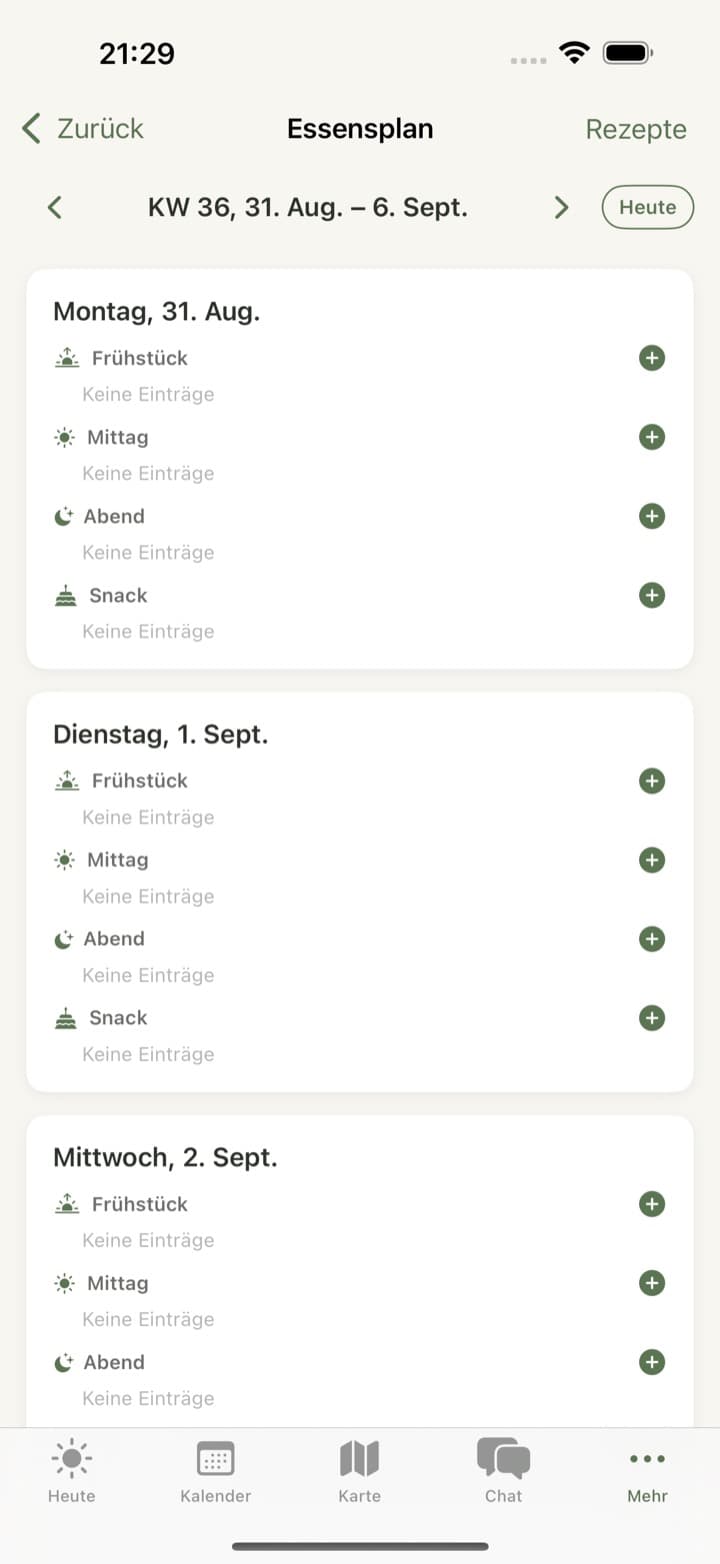
Plan recipes or short notes (‘order pizza’) for breakfast, lunch, dinner or snacks – for the whole family, or, for children without their own account, as a separate plan, such as the nursery menu.
Send ingredients to the shopping list
Send the ingredients of a single recipe, or the whole planned week, to a shopping list – Famora merges matching ingredients so the onion only shows up once.
What the Famora meal plan can do
Weekly plan by day and meal
Plan breakfast, lunch, dinner and snacks for every day – with a recipe or free text, and who's cooking.
Your own recipe box
Title, servings, ingredients with quantities, steps, emoji, photo and source – your recipes, editable anytime.
40 recipe templates in your language
Start with curated family recipes, available in 30 languages – one tap copies the template into your recipe box, and from then on it's yours.
Import a recipe via link
Paste the link to a recipe page and Famora reads out the title, ingredients and steps – you review the draft before it's saved. No AI call needed, and included in every plan.
Dietary notes per family member
Store dietary preferences like vegan, vegetarian or gluten-free for each person – if you plan a recipe that doesn't fit, Famora lets you know.
A separate plan for children without an account
Alongside the family plan, every child without their own account keeps their own meal plan – handy for the nursery or school menu, kept separate from the family's dinner.
Photograph the menu
From the Premium plan, photograph the weekly menu posted at nursery or school, and Famora picks out the day and dish in each column – you review the draft before saving.
Create a recipe from a description
Describe what you feel like cooking, and Famora Assistant suggests a matching recipe with ingredients and steps – exclusive to the Assistant plan.
On every device
Web, iPhone and Android – the meal plan is the same everywhere. It isn't currently available on Apple Watch or Wear OS.
Web
Full recipe and plan management in the browser at app.famora.one – create or import recipes, plan the week, and send ingredients to the shopping list.
iOS
Native iPhone app with the full meal plan: recipe box, templates, weekly plan, and, from Premium, menu recognition from a photo.
Android
Native Android app with the same full meal plan, templates, and, from Premium, photo recognition for menus.
What depends on your plan
The meal plan itself is included in every plan: the weekly plan, recipe box, the 40 recipe templates, recipe import via link, and sending a recipe or the whole week to the shopping list cost nothing extra on Basis, Family, Premium or Assistant. Children can see the plan but can't edit it – that stays reserved for adults. Two features are tied to higher plans: reading a menu from a photo shares its scan quota with the other AI features and needs at least the Premium plan; having a recipe created from a description is reserved for the Assistant plan, with a daily family quota.
Frequently asked questions about the meal plan
- Do planned recipes land on the shopping list automatically?
- Not automatically, no – but it takes just one tap: send the ingredients of a recipe, or the whole planned week, to a shopping list. Famora merges matching ingredients so flour or onions don't end up on the list twice.
- Can I keep a separate meal plan for my child even though they don't have their own account?
- Yes. Alongside the shared family plan, every child profile without its own account can keep its own meal plan – for example the nursery or school menu, kept separate from the family's dinner.
- Where do the 40 recipe templates come from?
- Famora comes with 40 curated family recipes, available in 30 languages. One tap copies a template into your own recipe box, where you can adjust it however you like.
- Can I import recipes from other websites?
- Yes, via a link. Famora reads the page's structured recipe data – the same data search engines read – and shows you a draft to review, with no AI call needed, included in every plan.
- Does Famora warn me if a planned recipe doesn't fit a family member's diet?
- Yes. If you've stored a dietary preference like vegan or gluten-free for someone, Famora warns you as soon as you plan a recipe that isn't marked accordingly.