Family Chat App
The private family chat for everything your family needs to say
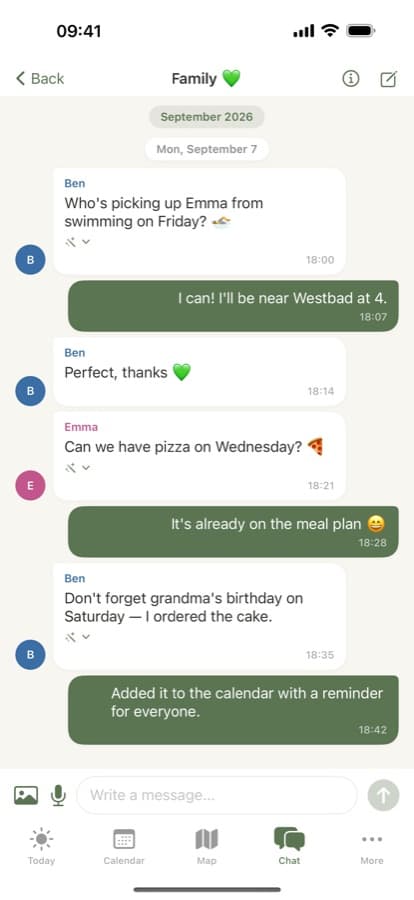
Who's picking up today, where are you meeting, is Dad home yet? Famora bundles your family's chat with the calendar, lists and reminders in one app: your own groups, a private chat visible only to the members you choose, photos and voice messages — stored on servers in Germany, with no ads, no tracking, no profiling.
How to set up your family chat
Create your family
Sign up in the app or in the browser at app.famora.one and give your family a name. The first 14 days are free; after that you choose a plan.
Invite your family
Open Family → Invite member and share the invite link or code. Everyone installs the app or opens the web app and joins with that code — no shared password needed.
Start chatting
The moment your family exists, Famora creates a shared group automatically. Send text, photos or voice messages — anyone with their own login can join in right away.
Set up a private group
When you need it, create a private group with just the members you pick — for planning a surprise, say. A private group is invisible to everyone else, including the family admin.
Set clean-up and notifications
Choose per group whether messages auto-delete after a number of days, or keep the history forever. You can edit or delete your own messages at any time.
What the Famora family chat can do
One chat group from day one
Famora creates a shared group automatically the moment your family exists. Anyone with their own login can send text, photos and voice messages — no separate app, no extra invite.
A private group, just for who you choose
Create a group with only the members you choose. It's invisible to everyone else — ask about it as an outsider, even the family admin, and the server answers "not found", the same as a group that never existed.
Encrypted at rest, not end-to-end
Your messages live on Famora's own servers in Germany, encrypted at rest. That's encryption at rest, not end-to-end — Famora itself could technically decrypt a message. In exchange, Famora runs no advertising, builds no profiles, and never sells your chats to third parties.
Photos and voice messages
Up to 10 MB per file. Attachments are never served from a public link — only streamed to that group's own members, over an authenticated connection.
Delivered in real time
New messages, read badges and the unread count arrive instantly, over a WebSocket connection, on every signed-in device at once.
Smart actions inside a message
Type a phone number, an address or a date, and the app makes it tappable — call, open the map, add the date. A pure client-side shortcut on web, iPhone and Android, no server round-trip involved.
Your family's own activity writes itself in
When someone arrives home (a geofence) or shares a shopping list, it shows up as a tappable message in the activity feed or chat — one tap jumps straight to the list or the event.
SOS lands straight in the chat
One tap sends your live location as a map link into the family's main chat group — with an optional one-time loud alert. It works even when a parent has switched chat off on a child's smartwatch, because an emergency can never depend on a setting.
Edit, delete, clean up
Fix a typo or delete your own message any time. Adults and the family admin can also remove messages for everyone — one, a selection, or a whole group — and set an auto-delete window per group.
Included the same way on every plan
The family chat is identical on Basis, Family, Premium and Assistant — no plan draws a line around groups, attachments or private chats. What grows with the plan is how many people can be in your family (3 / 6 / 10 / 20).
On every device
Web, iPhone, Android, Apple Watch and Wear OS — the family chat follows you everywhere, and only the feature set adapts to the size of the screen.
Web
Full feature set in the browser at app.famora.one — groups, private chats, photos, voice messages, smart actions, retention settings and clean-up for everyone.
iOS
Native iPhone app with the same full feature set, plus a push notification the moment a message is waiting for you.
Android
Native Android app, also with the full feature set, plus a badge count right on the home screen.
Apple Watch
Read and send text messages in your groups, dictate with voice-to-text or reply with a canned quick reply, and trigger SOS with your location. Photos, voice messages and private chats stay on phone and browser.
Wear OS
Just like Apple Watch: text, voice-to-text, quick replies and SOS on your wrist — photos and private groups live on the bigger screens.
What depends on your plan
The family chat itself is identical on every plan: groups, private chats, photos and voice messages, smart actions, retention settings and SOS are free and unrestricted on Basis, Family, Premium and Assistant alike. The only thing that grows with the plan is how many people your family can have: 3 on Basis, 6 on Family, 10 on Premium, 20 on Assistant.
Frequently asked questions about the family chat
- Is the Famora family chat end-to-end encrypted?
- No, and we'd rather say so plainly: messages are encrypted at rest on servers in Germany, not end-to-end. Famora could technically decrypt a message. In exchange, Famora runs no advertising, builds no user profiles, and never sells or shares your chats with third parties — that's the promise we can actually keep.
- Can I create a group that only some family members see?
- Yes, with a private group. Create a group with the members you choose, and it's private: nobody outside it — not even the family admin — can see it exists. Ask about it from outside and you get the same "not found" a group that never existed would give.
- Can a child without their own phone take part in the family chat?
- Not directly. A managed child profile (no email, no password, up to 3 free on every plan) has no login of its own, so nothing can send or read messages as that child — chat is for members who sign in themselves. Parents still keep that child's calendar, medication plan and responsibilities up to date from their own account.
- Does an SOS alert go through the chat?
- Yes. Tapping SOS sends your location as a map link straight into your family's main chat, in real time on every device — with an optional one-time loud alert if you choose it. It still works even when chat is otherwise switched off on a child's smartwatch.